

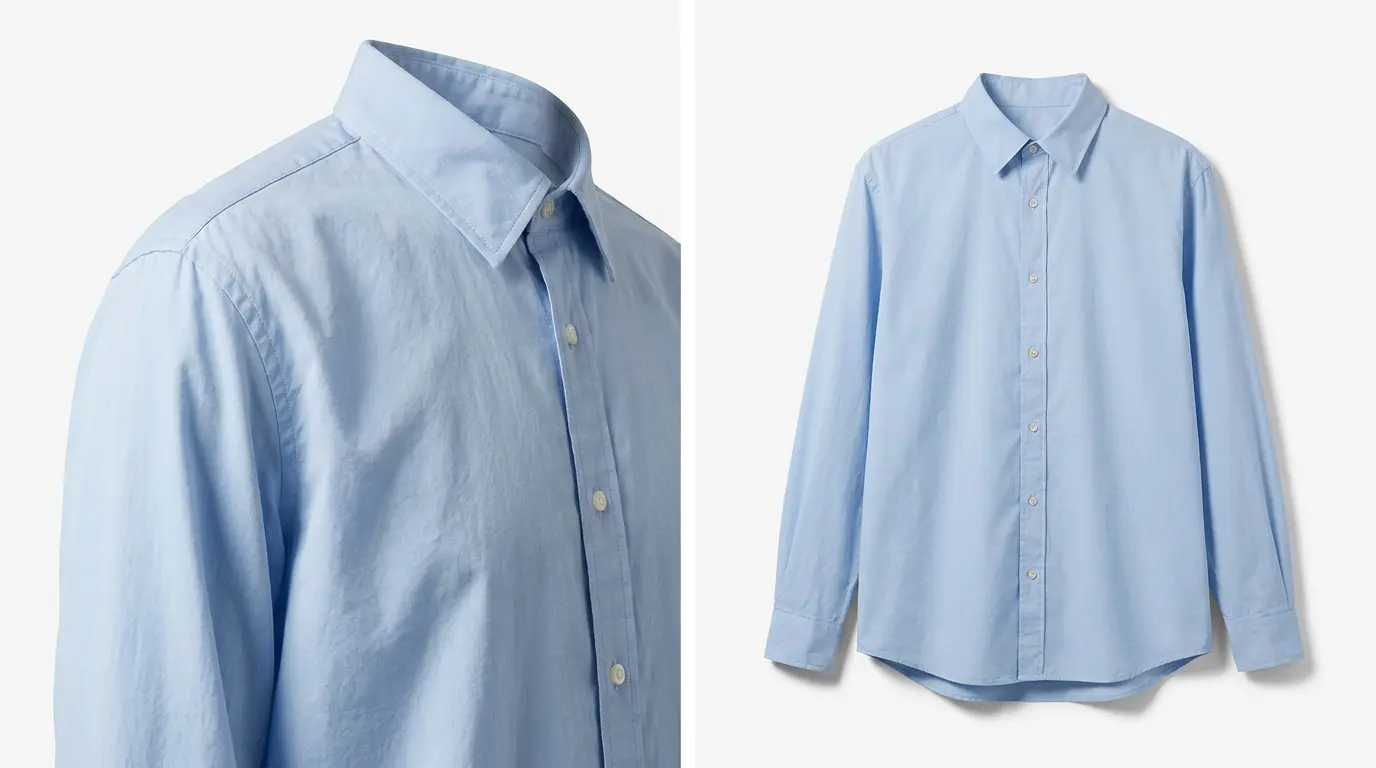
Illustrative example. One garment, two crop requirements. A style guide written for one often says nothing about the other.
Most fashion brands have a style guide. Fewer have a look that stays the same in image number 4,000.
The guide is usually fine. It covers crops, backgrounds, shadows and tone, and the first batch comes back right. The trouble starts a few weeks later, when a request arrives that the guide never imagined. A garment with an unusual drape. A flat lay shot under different light. A campaign crop that doesn't fit the catalog ratio. Someone makes a sensible call, the image ships, and nobody writes the call down.
Two weeks later a different editor meets the same situation and makes a different sensible call. Now you have two answers to one question, and your catalog quietly carries both.
We have been retouching for fashion and apparel brands for more than 21 years. In that time we have found that fashion retouching consistency is rarely lost inside the style guide itself. It is lost in the gaps around it, where nobody has yet decided what the guide means for this particular garment.
Where fashion style guides run out
The situations below are common in fashion production. They illustrate the questions a guide tends to leave open. They are not descriptions of specific client projects.
- Fabric and wrinkles. A guide says to reduce creases. On a crisp poplin shirt that is clear. On linen, creasing is part of what the fabric is. How much reduction is too much?
- Drape and silhouette. Shape correction and symmetry work help a garment look right. A guide that says "straighten the hem" does not say what to do with a skirt cut to fall unevenly.
- Ghost mannequin and flat lay. A ghost mannequin image combines front, back and inner shots into one garment with natural shape. A flat lay presents the same garment differently. When a collection mixes both, it is not obvious which shadow, alignment and neckline rules apply to which.
- Editorial and catalog. A guide written for catalog pages, with a fixed aspect ratio, may say nothing about how a campaign image of the same garment should be cropped or retouched.
- Lighting. If light shifts during a shoot day, matching every image to one tone can remove the mood an art director intended. Leaving it alone can leave a set looking uneven.
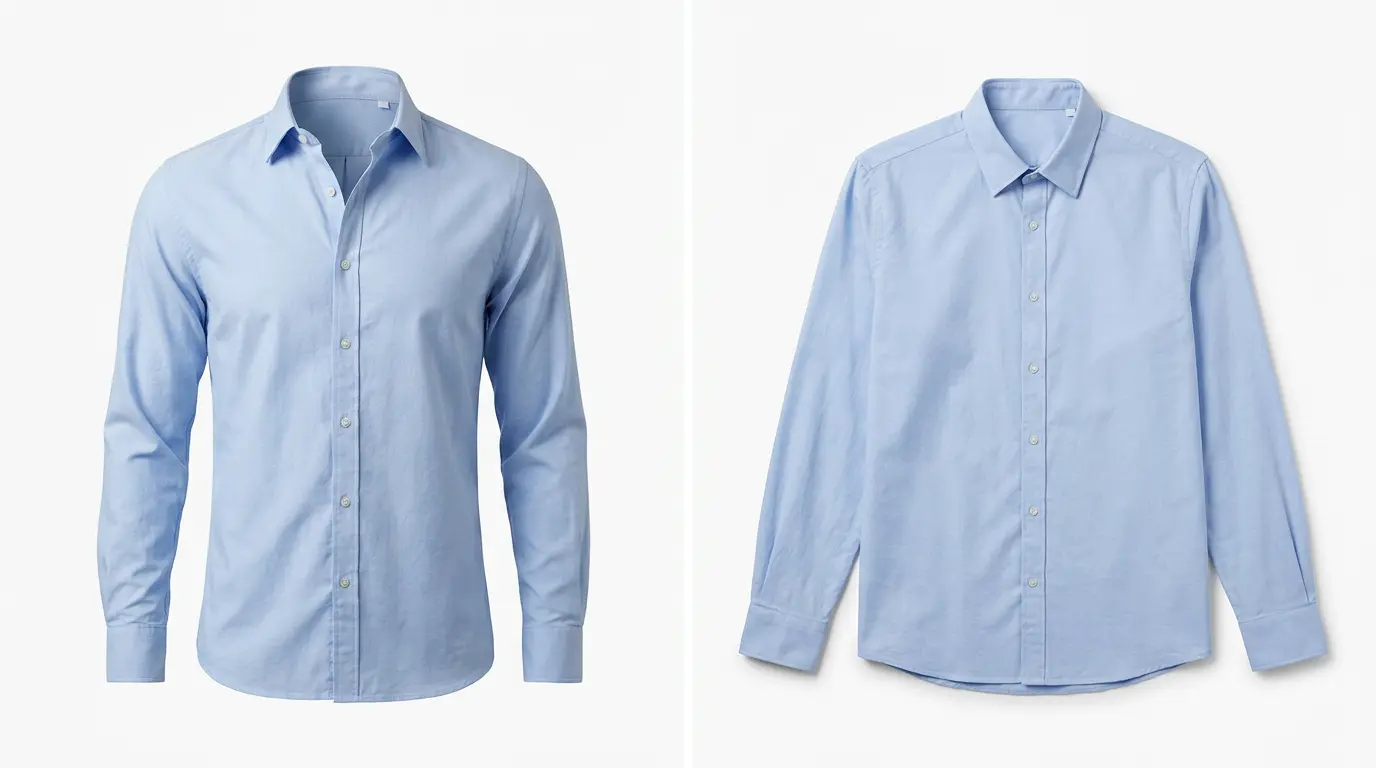
Illustrative example. A collection that mixes both presentations needs a clear rule for shadow, alignment and neckline.
None of these is an error. Each is a judgment call, and judgment calls are where a consistent look holds or starts to drift.
Agree the style on a few images first
When a client sends a style guide, brand assets and sample images, our Vice President or a Senior Manager receives them. The Senior Manager reads the guide in detail, turns it into production rules and plans how the samples will be edited. Questions are settled early: the Senior Manager goes through them with available support members, and anything still unclear goes to the Vice President or to the client by email.
Approval of a style then moves through three stages:
- Calibration: we edit 3 to 5 sample images and send them for your feedback.
- Revision: we update the samples based on your comments.
- Sign-off: you approve the style.
How many rounds of feedback this takes depends on the project. Simple projects may need one or two. Complex or highly brand-sensitive ones may need two or three. Either way, it is cheaper to find a misread tone on five images than on five hundred.
Write down what the guide leaves out
Once a style is signed off, it becomes a set of saved preferences. For fashion work, the details that make a look recognizable are often the ones a brand deck skips. They typically cover:
- Aspect ratios (such as 4:5), canvas size and output resolution
- Color profile and background values
- Shadow style: drop shadow, original shadow or a custom shadow
- Scale and alignment: how large the garment sits in the frame, and whether it is centered, top-aligned or bottom-aligned
- Masking, feathering, reflection and edge cleanup rules
- File formats, naming conventions, web-saved settings and layer structures
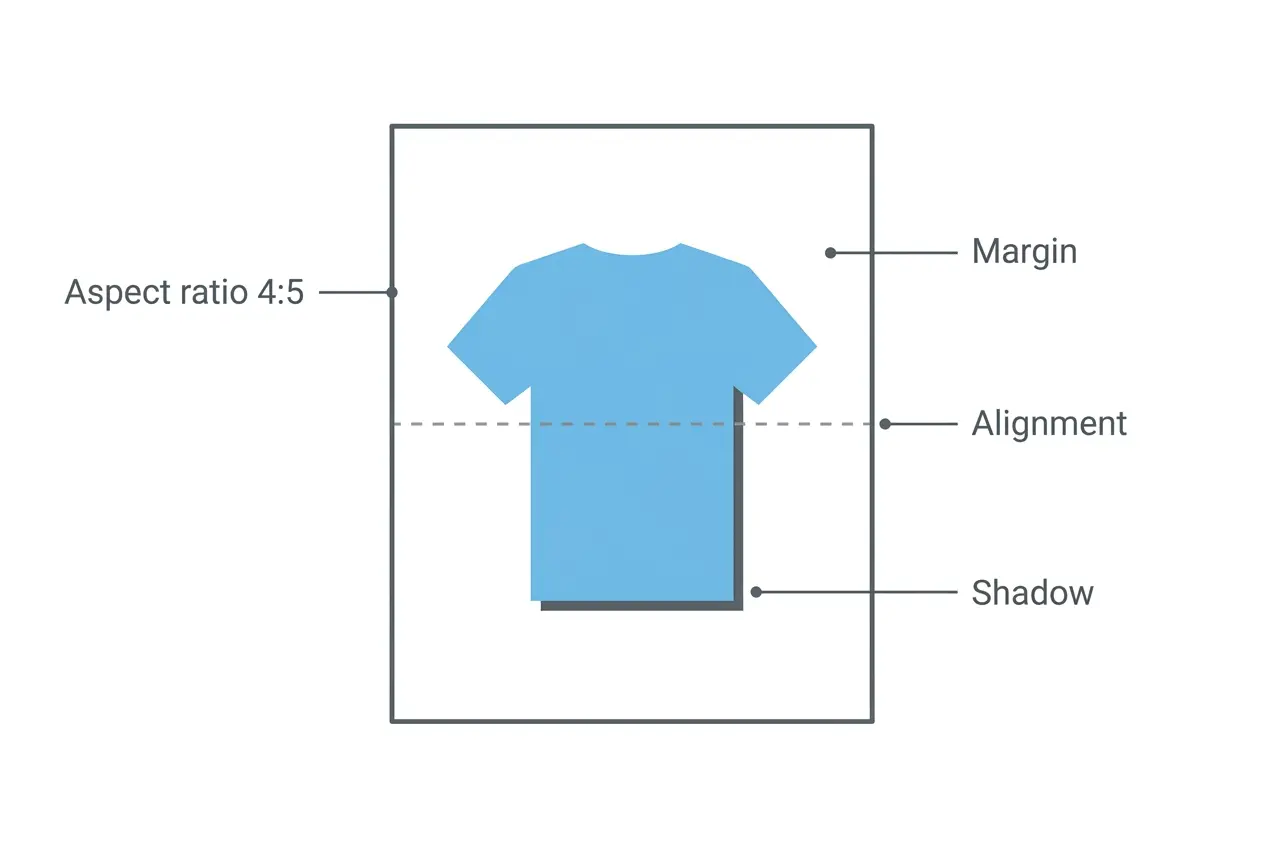
Illustrative diagram. Four of the details a saved preference can fix, so the next editor does not have to guess.
File naming and layer structure are on the list on purpose. Brands often judge a retouching partner by the pictures, then lose hours to files that are hard to find, review or pass to the next team.
What counts as an exception
Most decisions during editing are routine. The guide and the saved preferences answer them, and the editor gets on with the work.
An exception is different. It is an image or requirement where those instructions give no clear answer, or where following them would make the image look wrong. When an editor finds one, our documented practice is to tell the Vice President or Senior Manager, add a comment explaining the issue, and attach a screenshot or reference if it helps.
Who decides depends on what is at stake:
| Type of exception | Who decides |
|---|---|
| Minor | Senior Manager, working from the style guide |
| Client-impacting | Vice President or Senior Manager, who may consult you |
| Brand-risk | Director of Operations or Vice President |
Minor exceptions are settled internally, from the style guide, without coming to you. We consult you when:
- There is no existing rule.
- The decision affects your brand look, or legal and brand safety.
- The exception is likely to repeat in future batches.
- You have asked to approve such cases yourself.
- There are no reference images showing how the result should look.
These are the conditions for consulting you, not an invitation to ask about every image. A busy creative team does not need an email for every crease.
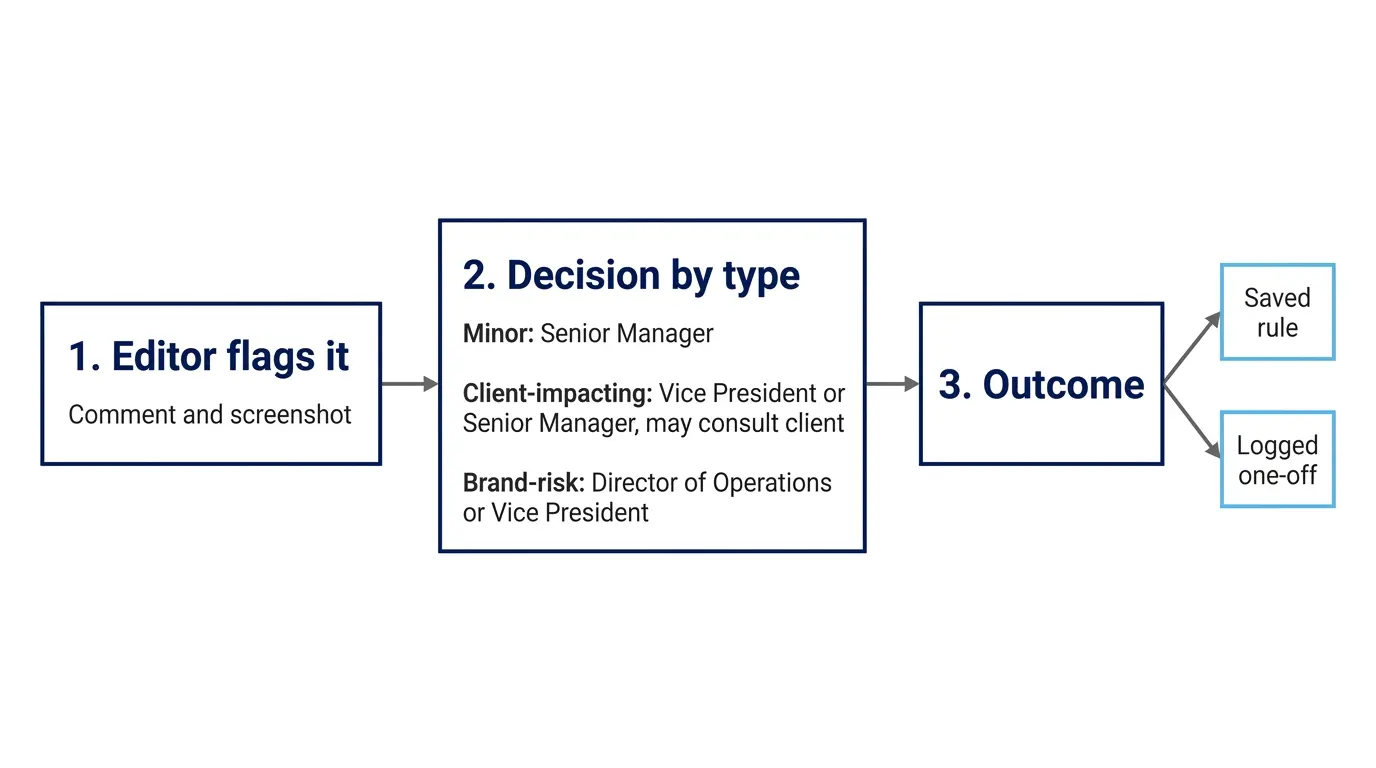
Illustrative diagram. The documented path of an exception. Not every unusual image needs to travel all of it.
A hypothetical example: the linen shirt
This example is illustrative. It does not describe a specific client project or an actual result.
Imagine a brand whose guide says to reduce wrinkles and creases. A batch arrives with linen shirts on a ghost mannequin. Removing every crease would flatten the linen until it reads as a different fabric. Leaving the creases untouched would contradict the guide.
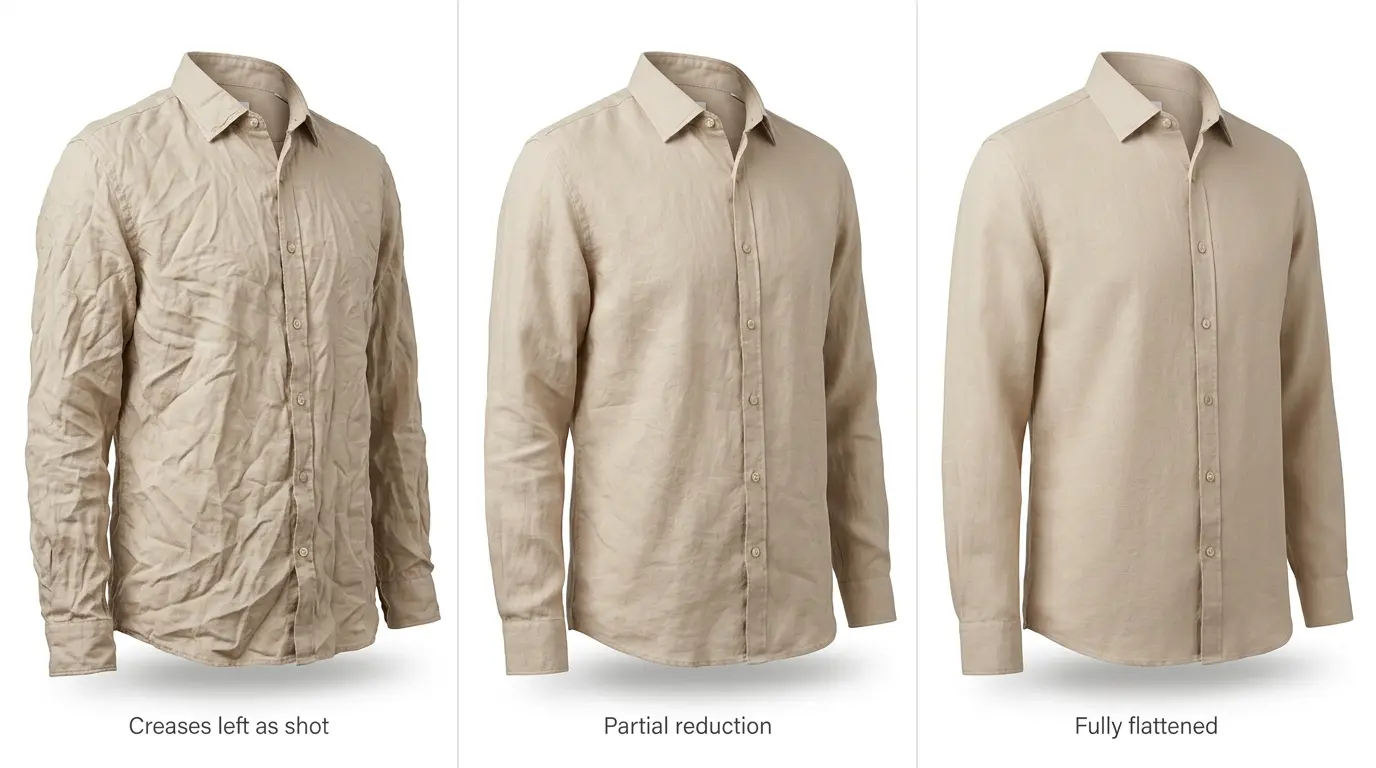
Illustrative example, not a client project. Three versions show why the guide alone cannot settle the question.
The guide does not settle it, so the editor flags it with a comment and a screenshot. The Senior Manager sees three things: there is no existing rule, the answer changes how the brand looks, and linen will come back in future batches. That meets the conditions for consulting the client, so the question goes to the brand: how much creasing should stay?
What the editor does not do is pick a level alone and ship. What the Senior Manager does not do is decide the brand's look without the brand. The client's answer is what turns a one-off judgment into something the whole team can follow.
When a decision becomes a rule
Not every answer should become a standard. We separate two cases.
A decision the client approves can be saved as a rule. Our practice is to record it in the internal style guide or SOP, the presets or templates, the QC checklist and the client's instruction drives, and to notify the team. From then on, the next editor and the QC reviewer work from a written answer instead of a fresh judgment call.
A case that is truly one-off is logged as an exception only. A single odd image should not quietly become your permanent standard.
A recurring exception sits between the two. When the same case keeps appearing, it is a candidate for a rule, and we think it is worth raising with the brand first. A pattern may mean the guide has a gap, or that something in the shoot is producing the same problem each time.
What you can do to make consistency easier
Whether your retouching runs in-house, through a freelancer or with a partner like us, three habits help most:
- Name one owner for exceptions. One person who can say yes or no keeps decisions from stalling or scattering.
- Keep one written home for rules. A decision that lives in a chat thread will be made again.
- Send a reference image with any unusual request. Without a picture of the intended result, even a good editor has to guess.
Key takeaways
- A style guide covers the cases you predicted. Consistency depends on what happens to the ones you did not.
- Exceptions need an owner and a written outcome: a rule, or a logged one-off.
- Recurring exceptions deserve review with the brand before they become standards.
Test how we read your style guide
The most direct way to judge a retouching partner is to hand over a few images your guide does not fully answer and see what happens. Send us up to three sample images with your style guide and any reference images, and we will edit them free. Include a hard case: a heavily textured fabric, a ghost mannequin shot, or a campaign crop. The free trial is intended for projects of 50 or more images, so tell us your expected volume.
The sample shows how we interpret your instructions on those images. It is not the full onboarding process described above.
Start your free trial
If you would rather talk first, you can speak with a real person on our team about how projects are set up, and about volume and timelines.
Talk to our team
Abdul Hashib Bipu
02 Nov 2026
From the blog
The latest industry news, interviews, technologies, and resources.

Abdul Hashib Bipu • 03 Nov 2026 • 6 min read
One Image Raised a Question. The Answer Changed the Workflow.
How one unexpected editing issue becomes an approved, documented instruction that keeps a whole image batch consistent.
Post Production Company
Professional Photo Editing

Abdul Hashib Bipu • 03 Nov 2026 • 11 min read
The Gold on Screen Has to Be the Gold in the Box
How jewelry editors decide what to correct, what to preserve and when to ask the brand, with practical guidance on gold tones, gemstones and reflections.
Product Photo Retouching
Professional Photo Editing

Abdul Hashib Bipu • 03 Nov 2026 • 9 min read
When One Rug Has to Look Like the Same Rug in Forty Photos
How to keep furniture and interior photos consistent across a full image set: what should change between rooms, what should not, and how calibration, saved rules, exception review and set-level QC cut repeated corrections.
Furniture Photo Retouching
Professional Photo Editing

Abdul Hashib Bipu • 03 Nov 2026 • 7 min read
Brand Consistency at Volume: What Happens After the Design Is Approved
How Studio Metrodesk keeps apparel and footwear images consistent at volume: style-guide rules, sample approval, saved settings, three QC checks and exception handling.
Post Production Company
Professional Photo Editing

Abdul Hashib Bipu • 03 Nov 2026 • 13 min read
How to Keep Photo Retouching On-Brand Across High-Volume Batches
How a client's style guide becomes production rules, and how those rules are tested, checked and updated as a project moves.
Post Production Company
Product Photo Retouching

Abdul Hashib Bipu • 03 Nov 2026 • 8 min read
Production-Ready Image Files: What We Check Before Delivery
How Studio Metrodesk checks image delivery specifications before files leave: dimensions, backgrounds, file naming, color settings and channel exports, with a checklist you can use.
Post Production Company
Professional Photo Editing
Hey! As you have come this far, why don't you take a chance on us?
Try Us for Free