

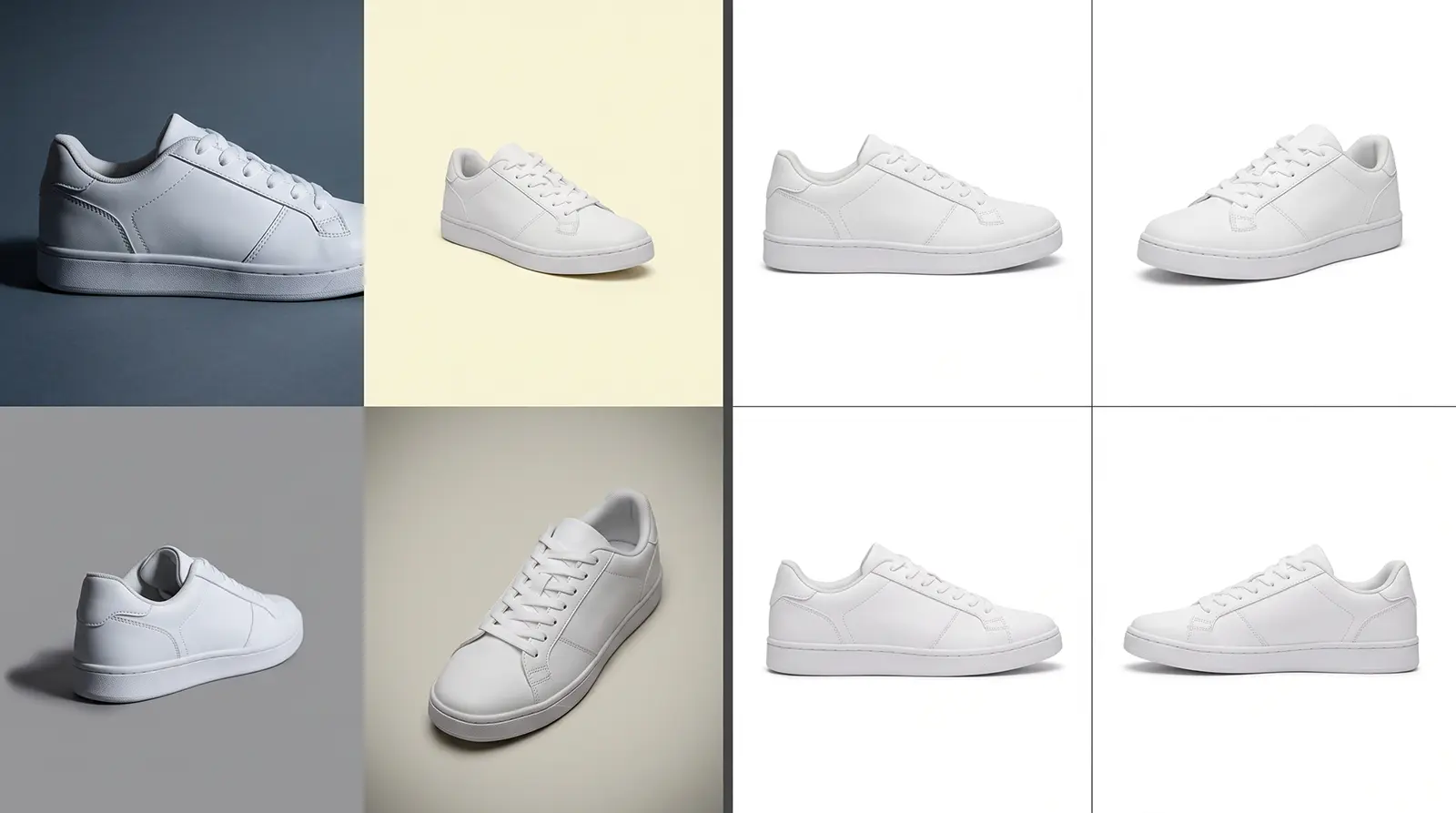
Illustrative example (AI-generated image, not a client project). Left: images without shared rules. Right: images edited to one saved standard.
Why the editors who deliver the same result twice are the ones who can explain the first one
A recent hiring post asked image editors to do something unusual: edit the image, record your screen, and explain every step. Say why you chose each tool. Give feedback on the result.
It's a telling request. It suggests that a correct image proves less than you'd think, and that the reasoning behind it is the part you can reuse.
Our own work is production retouching, but the same idea runs through how we keep batches consistent. We've also seen what happens without it.
The edit was right. Nobody can say why.
If you outsource retouching at volume, you've probably lived this. Batch one comes back perfect. Batch two goes to a different editor, and something is slightly off: the shadow, the crop, the shade of a product. Nobody made a mistake. The first editor made a judgment call, and it lived only in their head.
When the reasoning isn't written down, you can't hand it to the next editor or check whether it was followed. You can only compare outputs and argue.
Where the reasoning gets written down
At Studio Metrodesk, we treat the explanation as part of the work. It starts before the first production image.
The style guide becomes production rules. Your style guide, brand assets and sample images go to a senior manager, who translates them into rules and plans how the samples will be done. A shift lead checks technical feasibility: crop ratios, shadows, scaling, backgrounds. Open questions go to a short team meeting. If something is still unclear, we escalate to our Vice President or email you. We don't guess.
You approve the rules on samples, not on faith. We start with a calibration round of 3 to 5 images, then a revision round on your comments, then final sign-off. Simple projects can take one or two rounds. Brand-sensitive ones usually take two or three.
The approved rules are saved. Crop and aspect ratios, canvas size, resolution, color profile, background values, shadow style, alignment, masking and edge rules, file formats, naming conventions, layer structures. They live in shared folders, Photoshop actions and client-specific folders, so a new editor on your batch starts from your standard.
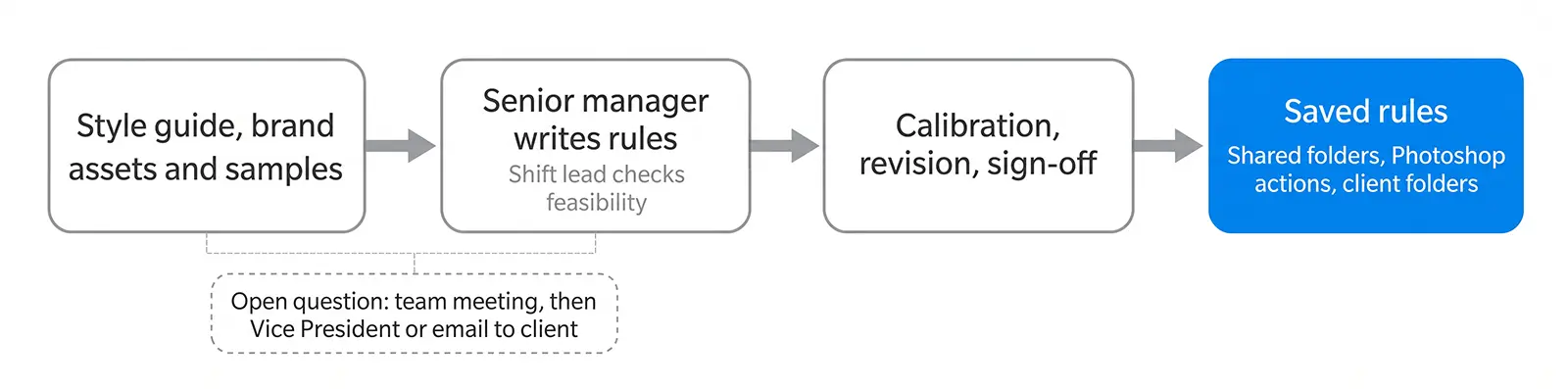
How a style guide becomes saved production rules.
What happens when an image breaks the rules
Rules cover most images. The rest are exceptions, and that's where consistency is usually lost.
Say a swatch code and the photo disagree. The editor doesn't force the number. They ask the same questions every time. Is the code in the right color space (HEX, RGB, CMYK or Pantone), and is it for the product or the background? Is the photograph telling the truth? That means checking the image profile, white balance, lighting, and whether the surface is glossy, metallic, matte or transparent. Can it be fixed without losing realism? If a perfect match would make the product look unnatural, the editor flags it as an exception instead of pushing through.
A flagged exception is never the editor's call alone. The editor reports it to a senior manager or the Vice President, explains the issue in a comment, and attaches a screenshot or reference where it helps. Who decides depends on the stakes. A senior manager settles minor cases against your style guide. Client-impacting cases go to the Vice President, who may consult you. Brand-risk cases go to our Director of Operations or the Vice President.
We bring you in when there's no existing rule, when the decision affects your brand look or legal safety, when it's likely to repeat, or when you've asked to approve such cases yourself.
Then comes the step that matters most. If you approve the decision, or the same exception keeps appearing, it's saved as a rule. It goes into the style guide, presets, QC checklist and your instruction drives. The team is notified and the rule is version-controlled. A truly one-off case is logged as an exception only, so one odd image doesn't quietly rewrite your standard.
The next batch doesn't re-argue the question.
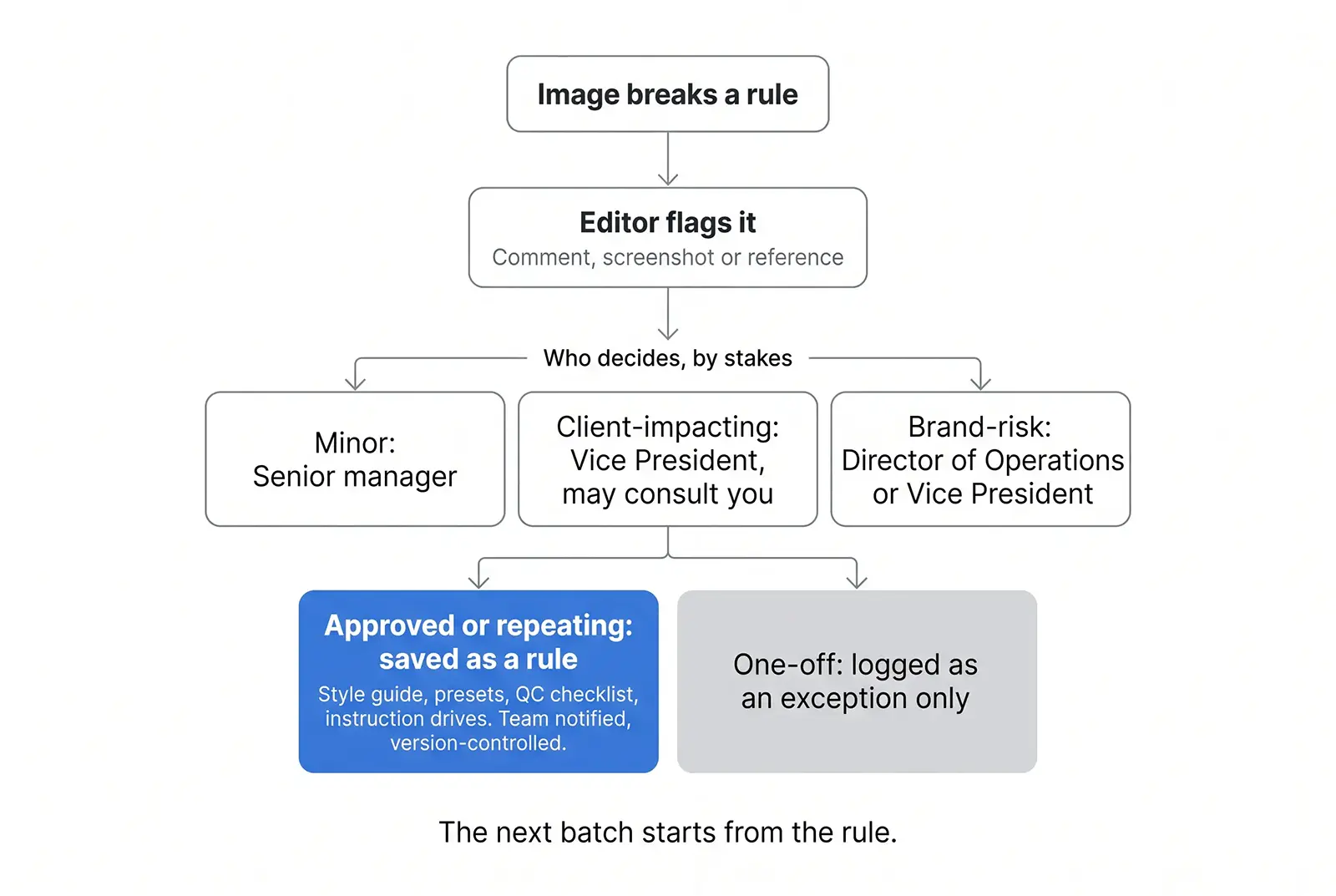
Approved or repeating exceptions become saved rules. One-offs are only logged.
Three checks, each looking for something different
Every order passes three QC steps. The first checks the retouching itself: masking, clipping paths, color, shadows and unnecessary edits. The second looks across the batch for inconsistency, color mismatch, missed instructions and brand-compliance problems, which only show when images sit side by side. The third, by a senior manager, checks delivery specs, your client-specific requirements, naming, metadata and format before anything leaves.
Fixing images that were never photographed
The same discipline applies to AI-generated fashion imagery, which we also correct. Our AI Fashion Model Retouching service covers finger and nail fixes, bone and ankle refinement, zipper and shoe details, logo replacement and arm positioning, aligned to your brand guidelines. Without a photograph to check against, "fix the hands" isn't a standard. What a correct hand, logo or zipper looks like for your brand has to be written down.
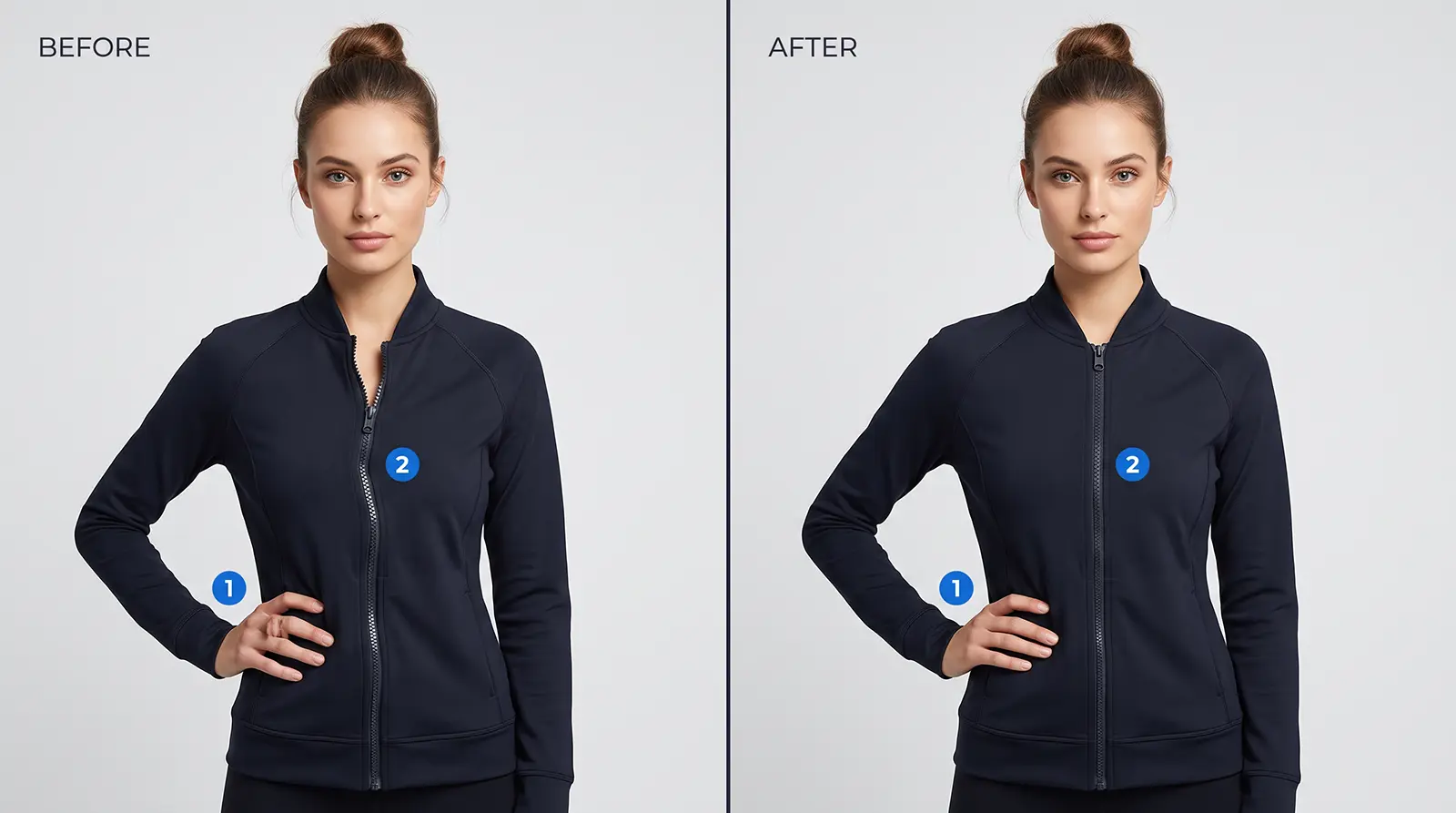
Illustrative example (AI-generated image, not a client project). Callout 1 marks the hand and callout 2 marks the zipper.
What this looks like over time
Consistency is hard to notice when it works. One client's own account gives a sense of what steady production can look like. Ryan Hunter, Senior Manager in International Sales in the US, said that over two years his company's image production costs came down by about 30%, without any loss of capacity, quality or lead time.
What to ask any editor or partner
Whether you hire a freelancer, build an in-house team or work with us, test whether the reasoning is visible:
- Who can see the rules? If they're only in someone's head, the next editor won't follow them.
- What happens to a weird image? You want a flag, a decision-maker and a record, not a quiet guess.
- Does a one-time decision ever become a standard? And does a one-off stay a one-off?
- Who checks the batch as a whole? A separate reviewer should look at consistency, not only single images.
Test it with your hardest images
Send us up to three sample images, ideally the ones your team worries about most, with your references and any swatch codes, and we'll edit them free. The free trial is meant for projects of 50 or more images, so tell us your expected volume. For ongoing work, you can try one week with a pro retoucher for $7.
Prefer to talk first? You'll reach a real person, not a bot: Lutfor Rahman Peri, our Vice President of Sales and Communication, backed by our 24/7 support team.
Abdul Hashib Bipu
09 Nov 2026
From the blog
The latest industry news, interviews, technologies, and resources.

Abdul Hashib Bipu • 10 Nov 2026 • 7 min read
Your Brand's Look Shouldn't Depend on Who Edits the Image
What we do in the first week with a new client so the hundredth image matches the first: calibration rounds, saved preferences, three QC checks and a clear path for exceptions.
Post Production Company

Abdul Hashib Bipu • 10 Nov 2026 • 8 min read
Five Angles, One Product: How We Keep an Image Set Consistent When More Than One Person Touches It
How a retouching team keeps every angle of a product looking like one shoot: sample approval, saved style rules, a three-step QC and a documented path for exceptions.
Post Production Company

Abdul Hashib Bipu • 01 Nov 2026 • 12 min read
AI Fashion Model Retouching: Why Identifying the Defect Comes First
How to describe AI fashion image defects so corrections match your brief: defect categories, a five-part framework and a QC overview.
Outsourcing Company
Post Production Company
Abdul Hashib Bipu • 02 Nov 2026 • 9 min read
A Style Guide Can't Cover Every Fashion Image. Here's What Happens Next.
A style guide can't cover every fashion image. See how documented exception handling keeps apparel retouching consistent across batches and editors.
Post Production Company
Professional Photo Editing

Abdul Hashib Bipu • 10 Nov 2026 • 6 min read
One Image Raised a Question. The Answer Changed the Workflow.
How one unexpected editing issue becomes an approved, documented instruction that keeps a whole image batch consistent.
Post Production Company
Professional Photo Editing

Abdul Hashib Bipu • 10 Nov 2026 • 7 min read
Brand Consistency at Volume: What Happens After the Design Is Approved
How Studio Metrodesk keeps apparel and footwear images consistent at volume: style-guide rules, sample approval, saved settings, three QC checks and exception handling.
Post Production Company
Professional Photo Editing
Hey! As you have come this far, why don't you take a chance on us?
Try Us for Free